
Can you find listening devices in your home? Yes, you can, and it’s essential to know how to do so. This guide will walk you through the process of checking for listening devices, often referred to as bugs, and provide actionable steps for enhancing your privacy and security. We’ll explore common hiding spots, tell-tale signs of electronic eavesdropping, and what to do if you suspect your home is being monitored. Protecting yourself from covert listening devices is crucial in today’s world, and a thorough home security check can offer peace of mind.
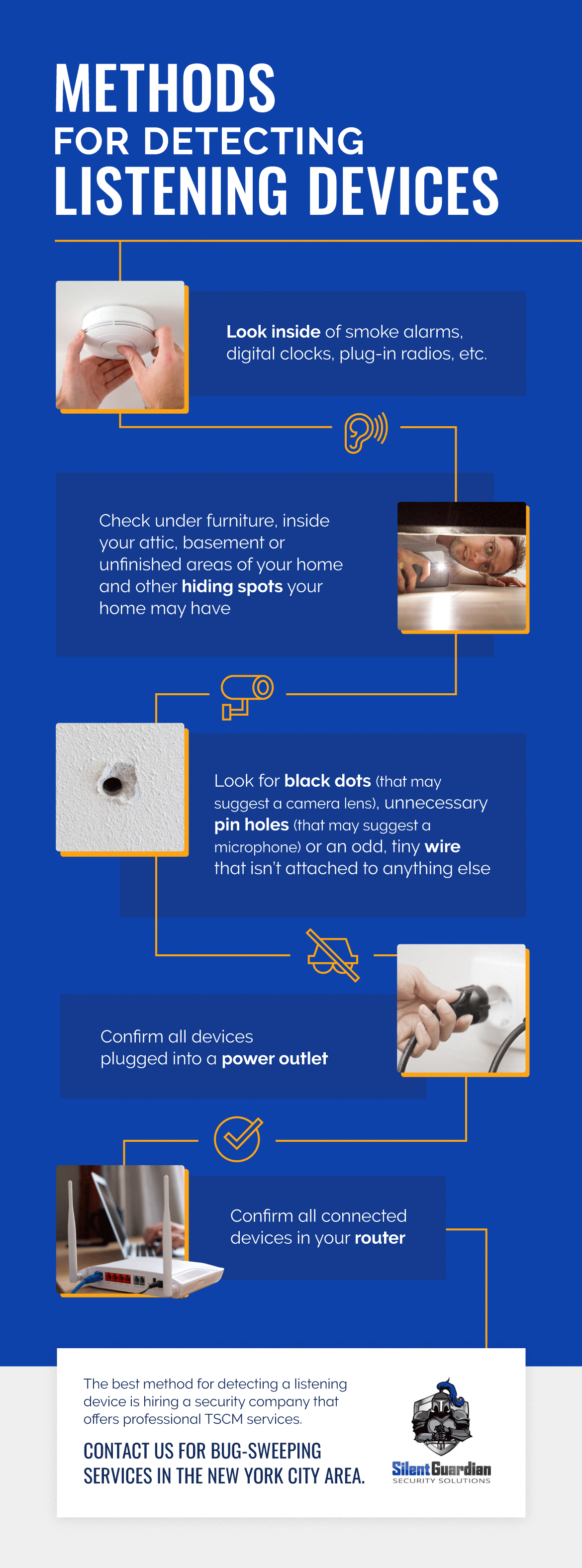
Image Source: silentguardiansecurity.com
Identifying Suspicious Objects
Spotting listening devices isn’t always straightforward, as they are designed to be inconspicuous. However, certain patterns and common hiding places can help you identify potential threats. These devices can range from simple microphones to sophisticated transmitters.
Common Hiding Spots for Bugs
Bug sweep professionals know that installers often target places that are easily accessible, offer good power sources, or are naturally overlooked.
- Electrical Outlets and Light Fixtures: These offer a convenient power source. Look for anything unusual, like a slightly loose plate, extra wires, or objects that don’t seem to belong.
- Smoke Detectors and Carbon Monoxide Alarms: These are often placed high up, giving a good vantage point. Modifications to the casing or unusual weight can be indicators.
- Pens, Books, and Decorative Objects: Small devices can be cleverly disguised within everyday items. If a new item appears suddenly or an old one seems out of place, investigate.
- Furniture: Upholstery, cushions, and even the legs of furniture can conceal small devices.
- Electronics: Printers, routers, televisions, and computers can all be modified to include listening devices. Look for extra ports or components.
- Air Vents and HVAC Systems: These can hide larger devices and transmit sound easily.
- Plush Toys and Stuffed Animals: Small microphones can be sewn into seams or hidden within the stuffing.
- Picture Frames and Wall Decorations: Devices can be placed behind or within the frame itself.
- Clocks and Radios: These are often plugged in and can easily house a transmitter.
Signs of Tampering or Unusual Presence
Beyond specific locations, a general sense of unease or noticing subtle changes can prompt a closer look.
- New or Unfamiliar Items: A sudden appearance of a new gadget, pen, or decorative item that you didn’t place.
- Slightly Ajar or Misaligned Objects: Outlets plates, vent covers, or even picture frames that aren’t perfectly aligned.
- Unusual Static or Buzzing: While often associated with phone lines, static can sometimes indicate active transmitters nearby.
- Oddly Placed Items: A smoke detector in an unusual spot or a clock that seems to have been moved.
- Small Holes or Discolorations: Tiny holes drilled into walls, furniture, or objects might be for microphones or antennas.
- Unexplained Power Surges or Drains: If electronics are behaving strangely, it could be due to an added component.
Manual Detection Methods: How to Find Bugs Yourself
While professional services are the most thorough, there are methods you can employ to conduct your own initial bug sweep. These rely on visual inspection, listening carefully, and using simple tools.
Visual Inspection Checklist
A systematic visual search is your first line of defense. Go room by room, paying close attention to the details.
- Begin with the Obvious: Check common hiding spots mentioned earlier.
- Examine Electronics: Unplug devices and look for any attached modules or unusual wiring.
- Inspect Walls and Ceilings: Look for small holes, loose paint, or areas that seem discolored or recently disturbed.
- Check Furniture and Decor: Feel around cushions, under tables, and behind pictures.
- Look for Anything Out of Place: Trust your intuition. If something feels “off,” investigate further.
Listening for Anomalies
Your ears can be a surprisingly effective tool if you know what to listen for.
- Tune into Ambient Noise: Turn off all electronics and appliances that might produce background noise. Sit in silence for a few minutes.
- Listen for Faint Buzzes or Hums: Some electronic devices emit a low-frequency sound when active.
- Check for Ticking Sounds: While less common with modern devices, older or simpler bugs might produce a faint tick.
Using a Radio Frequency (RF) Detector
An RF detector is a valuable tool for detecting active transmitters. These devices scan for radio frequencies that could be emitted by bugs.
- How RF Detectors Work: They pick up the radio waves that transmitting devices use to send information.
- What to Look For: As you sweep the detector around a room, it will alert you (usually with beeps or a display) when it detects a signal. The closer the signal, the louder or more intense the alert.
- Testing Your Detector: Before using it to search for bugs, test its sensitivity by turning on your mobile phone or Wi-Fi router and seeing if the detector responds.
- Sweep Strategy: Move the detector slowly and systematically across all surfaces, paying particular attention to objects and areas where you suspect a device might be hidden.
Utilizing Your Smartphone for Detection
Your smartphone has capabilities that can aid in your search.
- Wi-Fi Analyzer Apps: These apps can show you all the Wi-Fi networks and connected devices in your area. If you see an unknown device, it could potentially be a hidden camera or a device transmitting data.
- Signal Strength Meters: Some apps can help detect cellular signals. If a device is transmitting via cellular, these might offer clues.
- Camera Lens Detection: Some apps claim to help find hidden cameras by detecting the reflection of their lenses. You can also try turning off all the lights and using your phone’s flashlight to scan for small, glinting reflections.
Table 1: Simple Bug Detection Tools and Their Uses
| Tool | Primary Use | Limitations |
|---|---|---|
| Visual Inspection | Identifying suspicious objects and tampering | Requires meticulous attention to detail; may miss well-concealed devices |
| Your Ears | Detecting faint electronic hums or buzzes | Subjective; may not detect silent devices |
| RF Detector | Locating active transmitting devices | Cannot detect non-transmitting devices; can be triggered by legitimate signals |
| Smartphone Apps | Identifying unknown Wi-Fi/network devices | Effectiveness varies; requires careful interpretation of results |
| Smartphone Flashlight | Detecting lens reflections from cameras | Only effective for cameras with lenses; requires dark environment |
Advanced Detection: When to Call Professionals
While DIY methods can be helpful, they often fall short of identifying sophisticated or cleverly hidden devices. For comprehensive surveillance detection, engaging professionals is often necessary. This is where TSCM services (Technical Surveillance Counter-Measures) come into play.
What are TSCM Services?
TSCM services involve a systematic and technical approach to identifying and neutralizing unauthorized listening devices, hidden cameras, and other forms of electronic eavesdropping. These services are performed by trained technicians using specialized equipment.
The Professional Bug Sweep Process
A professional bug sweep is a multi-faceted operation designed to be thorough and discreet.
- Equipment Used: Professionals utilize a range of advanced equipment, including:
- Non-Linear Junction Detectors (NLJD): These devices detect semiconductor components, which are present in virtually all modern electronic devices, even if they are turned off or have no power.
- Spectrum Analyzers: Used to scan the entire radio frequency spectrum for unauthorized transmissions.
- Thermal Imagers: Can detect heat signatures emitted by active electronic devices.
- Infrared Scanners: Can identify hidden cameras that emit infrared light for night vision.
- Network Analyzers: To identify unauthorized devices connected to your network.
- Methodology: The process typically involves:
- Initial Assessment: Understanding the client’s concerns and the environment to be searched.
- Physical Inspection: A detailed visual sweep of the premises.
- RF Spectrum Analysis: Scanning for any transmissions.
- Non-Linear Junction Detection: Checking for hidden electronic components.
- Infrared and Thermal Scanning: Looking for hidden cameras and active devices.
- Network Analysis: Examining wired and wireless network traffic.
- Reporting and Recommendations: Providing a detailed report of findings and advising on remediation.
When to Consider Professional Help
You should consider professional TSCM services if:
- You have highly sensitive information: If your work or personal life involves confidential data, the risk of being targeted increases.
- You have experienced a security breach: If you believe your home has already been compromised.
- You have recurring suspicions: If your intuition strongly suggests you are being monitored, even after DIY checks.
- You have a high-value asset: If you are a high-net-worth individual or possess valuable intellectual property.
- You are involved in legal disputes: Sometimes, parties in litigation may resort to illegal surveillance.
Table 2: DIY vs. Professional Bug Detection
| Feature | DIY Methods | Professional TSCM Services |
|---|---|---|
| Thoroughness | Limited; dependent on user’s knowledge and equipment | Comprehensive; uses specialized, high-end equipment and trained personnel |
| Detection Range | Primarily active transmitters and visible anomalies | Detects active, passive, and dormant devices; even components of compromised systems |
| Equipment Cost | Relatively low (e.g., RF detector, apps) | High; service cost reflects equipment and expertise |
| Expertise | Requires self-learning and careful execution | Performed by trained and experienced technicians |
| Confidentiality | Depends on user; less formal | Highly confidential; professionals are bound by strict non-disclosure agreements |
| Outcome | May provide preliminary findings; often inconclusive for advanced threats | Provides definitive findings, detailed reporting, and remediation advice; highest assurance |
Counter-Surveillance Strategies and Prevention
Once you’ve checked your home or had it professionally swept, implementing counter-surveillance measures is vital to maintain your privacy moving forward.
Securing Your Network
Your home network is a potential entry point for sophisticated attackers.
- Strong Passwords: Use complex, unique passwords for your Wi-Fi and all connected devices.
- Update Router Firmware: Keep your router’s software updated to patch security vulnerabilities.
- Disable UPnP: Universal Plug and Play can be exploited by malware.
- Use a VPN: A Virtual Private Network encrypts your internet traffic, making it harder to intercept.
- Secure Smart Devices: Change default passwords on smart home devices, disable unnecessary features, and research the security of any new devices before purchasing.
Physical Security Measures
Enhancing the physical security of your home can deter intrusion and make it harder to plant devices.
- Secure Entry Points: Ensure doors and windows are locked and consider adding deadbolts or security film.
- Alarm Systems: A comprehensive alarm system can deter intruders and alert you to unauthorized access.
- Motion-Activated Lighting: This can deter potential installers and make them more visible.
- Security Cameras: Visible cameras can act as a deterrent. Ensure they are placed strategically and are not themselves compromised.
Digital Hygiene
Practicing good digital habits is part of an overall counter-surveillance strategy.
- Be Wary of Unknown Devices: If you receive a new electronic item as a gift or find one unexpectedly, be suspicious.
- Regularly Scan Devices: Use reputable antivirus and anti-malware software on your computers and mobile devices.
- Review Device Permissions: Check which apps have access to your microphone and camera on your smartphones and computers.
- Limit Information Sharing: Be mindful of the personal information you share online.
What to Do if You Find a Device
If your search, whether DIY or professional, uncovers a suspected listening device or hidden camera, it’s crucial to act with caution.
- Do Not Touch or Move It: Handling the device could tamper with evidence or trigger a data wipe.
- Note its Location and Appearance: Make a mental note or discreetly photograph it if possible.
- Secure the Area: If you suspect ongoing surveillance, avoid discussing sensitive matters in the vicinity.
- Contact Authorities: If you believe you are a victim of illegal surveillance, report it to your local law enforcement.
- Contact TSCM Professionals: They can safely retrieve the device, analyze it for intelligence, and provide expert advice.
Frequently Asked Questions (FAQ)
Q1: How often should I check for listening devices?
A: The frequency depends on your perceived risk. If you handle highly sensitive information or have specific concerns, a periodic check (e.g., every 6-12 months) combined with ongoing vigilance is advisable. For most individuals, a diligent visual inspection whenever you notice something unusual is sufficient.
Q2: Can my Wi-Fi router be used to listen in?
A: While a standard Wi-Fi router itself doesn’t typically have listening capabilities, it can be compromised with malware that turns on its microphone (if it has one) or transmits data. Furthermore, sophisticated attackers can use rogue access points or exploit vulnerabilities in your network to gain access to your devices.
Q3: Are there simple household items that can detect bugs?
A: While not as sophisticated as specialized equipment, your ears, a flashlight, and a smartphone (with specific apps) can provide some basic detection capabilities for certain types of devices. However, they are not foolproof and cannot detect all forms of surveillance.
Q4: Is it legal for someone to place listening devices in my home?
A: In most jurisdictions, placing listening devices in a private residence without the owner’s consent is illegal and a serious invasion of privacy. Laws vary, but typically, such acts fall under wiretapping or eavesdropping statutes.
Q5: What is the difference between a bug sweep and a general home security check?
A: A general home security check typically focuses on physical security like locks, alarms, and external vulnerabilities. A bug sweep is a specialized service that specifically targets electronic surveillance devices, using technical equipment and expertise to find hidden microphones and cameras, often as part of broader counter-surveillance efforts.
By remaining aware, employing simple detection techniques, and knowing when to seek professional assistance, you can significantly enhance your home’s security and protect yourself from unwanted electronic eavesdropping.