
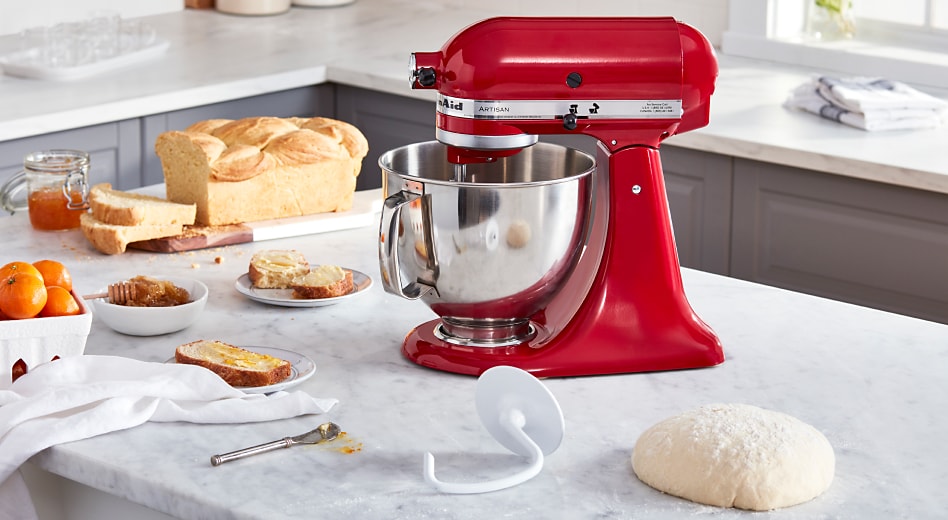
Image Source: www.kitchenaid.com
How Long To Knead Bread Dough In KitchenAid Mixer Guide
How long should you knead bread dough in a KitchenAid mixer? Typically, bread dough requires 8-10 minutes of kneading in a KitchenAid mixer on a medium-low speed setting (usually speed 2 or 4) using the dough hook attachment to achieve optimal gluten development.
Kneading is the heart of bread making. It’s what gives your bread its structure, chewiness, and airy crumb. While many bakers instinctively knead by hand, a stand mixer like a KitchenAid can be a game-changer, especially for those who bake frequently or have large batches. However, mixing bread dough KitchenAid isn’t as simple as just turning it on and walking away. There’s a sweet spot for KitchenAid mixer bread dough time, and getting it right is crucial for successful loaves.
The Science Behind the Knead: Gluten Development
Before we dive into specific times, let’s quickly look at why kneading is so important. When you mix flour, water, yeast, and salt, you create proteins called glutenin and gliadin. As you work the dough, these proteins link up and form a strong, elastic network called gluten.
- Gluten traps the carbon dioxide gas produced by the yeast. This trapped gas makes the dough rise.
- A well-developed gluten network allows the dough to stretch without tearing, giving bread its characteristic structure.
- Over-kneading can break down this network, leading to dense, tough bread. Under-kneading results in a weak structure, causing the bread to spread out instead of rising.
Fathoming the Perfect Knead Time for Your KitchenAid
The optimal kneading time KitchenAid depends on several factors:
- The Recipe: Different flours have varying protein content, which affects how quickly gluten develops. Bread flour, with its higher protein, will develop gluten faster than all-purpose flour. High hydration doughs (wetter doughs) often require longer kneading.
- The Mixer’s Power: KitchenAid mixers come in different horsepower ratings. A more powerful mixer might knead slightly faster than a less powerful one.
- The Speed Setting: KitchenAid mixers have multiple speed settings. For bread dough development KitchenAid, you want to use a speed that allows the dough to knead without overheating or straining the motor. The KitchenAid dough setting is generally between speed 2 and 4.
- Your Dough’s Consistency: A shaggy, wet dough will behave differently from a drier, firmer dough.
Decoding the Dough Hook: Proper Bread Dough Mixing Duration
The dough hook is your best friend when it comes to bread dough development KitchenAid. It’s designed to mimic the motion of kneading by hand, but with more consistent power.
What is the dough hook bread kneading process?
The dough hook works by pulling the dough down and then folding it over itself, repeating this cycle. This action stretches and aligns the gluten strands, building that essential elastic network.
How long to mix bread dough KitchenAid?
As a general rule of thumb, aim for 8-10 minutes of kneading at a medium-low speed (usually speed 2 or 4). This is the best kneading time for bread dough in most standard recipes.
Identifying Dough Readiness: Visual and Tactile Cues
Instead of relying solely on a timer, it’s crucial to learn how to tell when your dough is ready. This is where the art of bread making comes in.
The Windowpane Test
This is the gold standard for checking gluten development:
- Stop the mixer.
- Gently pinch off a small piece of dough.
- Slowly stretch the dough between your fingers.
- If you can stretch it thin enough to see light through it (like a windowpane) without it tearing, your gluten is well-developed.
- If it tears easily, it needs more kneading.
Other Indicators:
- Smoothness and Elasticity: The dough should look smooth and feel elastic. It will spring back slowly when poked with a floured finger.
- Clean Sides of the Bowl: As the gluten develops, the dough will become less sticky and start to pull away from the sides of the mixing bowl, gathering around the dough hook.
- Consistency: The dough should be cohesive and not excessively sticky or shaggy.
When Does KitchenAid Mixer Bread Dough Time Vary?
While 8-10 minutes is a good starting point, you might need to adjust your KitchenAid mixer bread dough time based on specific circumstances:
Recipe Variations and Their Impact
- Enriched Doughs: Doughs with eggs, butter, milk, or sugar (like brioche or challah) often require a bit longer kneading. The fat and sugar can inhibit gluten development initially. You might find yourself kneading for 10-12 minutes for these richer doughs, always checking for that windowpane.
- Whole Wheat Doughs: Whole wheat flour contains bran and germ, which can cut into gluten strands and make the dough weaker. It may require slightly longer kneading or a period of resting (autolyse) before full kneading to allow the bran to absorb moisture.
- High Hydration Doughs: Wetter doughs can be more challenging to knead. They might appear wetter for longer. The dough hook bread kneading in a KitchenAid is particularly helpful here, as it can manage stickier doughs better than hand kneading. Expect to knead for the full 10-12 minutes, watching for that clean pull from the bowl.
Mixer Speed: The Critical Factor
- Speed 1 (Stirring): Too slow for effective kneading. This is more for initial mixing of ingredients.
- Speed 2 (Add & Mix): A good starting point for incorporating ingredients and initial development.
- Speed 4 (Mix): Often the sweet spot for bread dough development KitchenAid. It provides enough power for gluten to form without overworking the dough or motor.
- Speed 6 (Whisk/Beat): Too fast for most bread doughs. This speed can overheat the motor and tear the gluten.
Crucially, always start on a lower speed and gradually increase to speed 2 or 4. This prevents a flour explosion and allows the gluten to start forming gently.
The Role of Flour in Kneading Duration
| Flour Type | Typical Kneading Time (KitchenAid) | Notes |
|---|---|---|
| Bread Flour | 8-10 minutes | High protein, develops gluten well. |
| All-Purpose Flour | 8-12 minutes | Lower protein, may need slightly longer. |
| Whole Wheat Flour | 10-15 minutes | Bran can hinder gluten; consider autolyse. |
| Rye Flour | 6-8 minutes | Lower gluten potential, can become gummy if over-kneaded. |
| Pastry Flour | Not recommended for bread | Low protein, designed for tender baked goods. |
| Cake Flour | Not recommended for bread | Very low protein, for delicate cakes. |
Beyond the Mixer: What Happens Next?
Once your dough has achieved the perfect windowpane, the kneading is complete.
- Remove the Dough: Stop the mixer. Gently scrape down the dough hook and remove the dough from the bowl.
- Shape and Rise: Shape the dough into its desired form (e.g., a ball for a round loaf, a log for a baguette). Place it in a lightly oiled bowl, cover it, and let it rise (first proof).
Can I Knead Bread Dough Too Much in a KitchenAid?
Yes, absolutely! Over-kneading is a common mistake. If you knead for too long, or at too high a speed, you can break down the gluten network. This results in a dough that is:
- Tough and Rubbery: It won’t stretch easily and might feel like chewing gum.
- Tears Easily: The windowpane test will show it tearing quickly.
- Dense Bread: The weak gluten network won’t trap gas effectively, leading to a dense loaf.
- Gummy Texture: The crumb can be sticky and unpleasant.
Always err on the side of under-kneading rather than over-kneading. You can always knead for another minute, but you can’t undo over-kneading.
KitchenAid Dough Setting: Finding the Right Gear
For most bread doughs, the KitchenAid dough setting to aim for is Speed 2 or Speed 4.
- Speed 2: This is a good speed for initial development and for softer doughs. It provides a gentle kneading action.
- Speed 4: This is generally considered the most effective speed for robust gluten development in bread doughs. It’s fast enough to efficiently work the dough without being too aggressive.
Never use higher speeds like 6 or 10 for bread dough. These speeds are too fast and can damage the gluten structure, overheat the mixer’s motor, and lead to a dense loaf.
Bread Machine Dough Kneading vs. KitchenAid
While both are automated, there’s a difference:
- Bread Machine: Designed for specific cycles. The bread machine dough kneading often involves shorter, more intense bursts of kneading. You typically add ingredients and select a program.
- KitchenAid Mixer: Offers more control. You can monitor the dough, adjust the time, and perform the windowpane test. The dough hook bread kneading in a KitchenAid allows you to intervene if needed.
The KitchenAid mixer bread dough time is more about observation and technique, while bread machine dough kneading is more about following the machine’s pre-set programs.
Tips for Successful KitchenAid Kneading
- Start Slow: Begin by mixing ingredients on a low speed (Speed 1 or 2) until a shaggy dough forms.
- Gradually Increase Speed: Once the dough starts to come together, increase the speed to 2 or 4.
- Scrape Down Occasionally: If the dough is sticking excessively to the sides, stop the mixer and scrape down the bowl with a spatula.
- Don’t Overload the Mixer: Stick to recipes that are within your KitchenAid’s capacity. Overloading can strain the motor.
- Know Your Flour: Adjust kneading time based on the type of flour you’re using.
- Trust Your Senses: The windowpane test is your most reliable indicator. Don’t just rely on the clock.
- Feel the Dough: As you gain experience, you’ll develop a feel for when the dough is properly kneaded. It should feel smooth, elastic, and alive.
- Humidity Matters: On humid days, dough can feel wetter. On dry days, it might feel drier. Adjust your kneading time slightly if needed, but always prioritize the windowpane test.
- Clean Bowl = Done: When the dough has been kneading for a while and starts to pull away cleanly from the sides of the bowl and climb the dough hook, it’s a good sign of development.
Troubleshooting Common KitchenAid Kneading Issues
| Problem | Cause | Solution |
|---|---|---|
| Dough is too sticky | High hydration, not enough kneading, or flour type. | Continue kneading for a few more minutes. If still sticky, add flour one tablespoon at a time. Ensure you’re using the correct speed (2-4). |
| Dough tears easily | Under-kneaded. | Knead for another 2-5 minutes and re-test. |
| Dough is tough/rubbery | Over-kneaded or kneaded at too high a speed. | Stop kneading immediately. You may need to rest the dough for 15-30 minutes to relax the gluten before shaping, but the final texture might be affected. |
| Mixer motor overheats | Dough is too stiff/dry, overloaded mixer, or kneaded for too long at too high a speed. | Stop the mixer and let it cool. Reduce kneading time or speed. Ensure your dough isn’t too stiff. For very stiff doughs, consider adding a little more liquid or finishing by hand. |
| Dough isn’t developing | Using the wrong attachment (beater instead of dough hook), or kneading at too low a speed. | Ensure you are using the dough hook attachment. Increase the speed to 2 or 4. |
Comprehending KitchenAid Mixer Bread Dough Time: A Summary
Achieving the perfect bread dough development KitchenAid requires a balance of time, speed, and observation. The general guideline of 8-10 minutes at speed 2 or 4 is an excellent starting point. However, the most critical element is learning to recognize when your dough has reached the ideal stage of gluten development, primarily through the windowpane test.
Remember, baking is a journey. Each flour, each recipe, and even each day can present slight variations. By paying attention to your dough and applying the principles of gluten development, you’ll master the art of mixing bread dough KitchenAid and produce consistently delicious loaves. Enjoy the process, and happy baking!
Frequently Asked Questions (FAQ)
Q1: What speed should I use to knead bread dough in a KitchenAid?
A1: For most bread doughs, Speed 2 or Speed 4 is ideal. Speed 2 is good for initial development and softer doughs, while Speed 4 offers efficient gluten development for most bread types. Avoid higher speeds, as they can overheat the motor and damage the gluten.
Q2: How long does it typically take to knead bread dough in a KitchenAid?
A2: The typical KitchenAid mixer bread dough time is between 8 to 10 minutes. However, this can vary based on the recipe, flour type, and mixer power. Always rely on the windowpane test rather than just a timer.
Q3: What is the windowpane test, and why is it important?
A3: The windowpane test is a method to check gluten development. You gently stretch a small piece of dough; if you can stretch it thin enough to see light through it without it tearing, the gluten is well-developed. It’s important because it indicates the dough has the strength to hold gas and rise properly.
Q4: Can I knead bread dough for too long in a KitchenAid?
A4: Yes, over-kneading can occur. If you knead for too long or at too high a speed, the gluten network can break down, resulting in tough, rubbery, or dense bread. It’s better to err on the side of slightly under-kneaded than over-kneaded.
Q5: My dough is very sticky. What should I do?
A5: If your dough is too sticky after 8-10 minutes of kneading, continue kneading for a few more minutes. If it remains excessively sticky, add flour one tablespoon at a time until it starts to pull away from the sides of the bowl. Ensure you are using the correct speed (2-4). High hydration doughs will naturally be stickier.
Q6: Is the dough hook attachment necessary for kneading bread dough in a KitchenAid?
A6: Yes, the dough hook attachment is specifically designed for kneading dough. Using a flat beater or whisk will not develop gluten properly and can damage the mixer.
Q7: How do I know when the dough is ready without using the windowpane test?
A7: Besides the windowpane test, look for visual and tactile cues: the dough should be smooth, elastic, and spring back slowly when poked. It should also start to pull away from the sides of the bowl and gather around the dough hook.
Q8: Does the type of flour affect the kneading time?
A8: Yes, it does. Bread flour, with its higher protein content, generally requires less kneading than all-purpose flour. Whole wheat flour may require longer kneading or a resting period due to the bran and germ interfering with gluten development.
Q9: What’s the difference between KitchenAid kneading and bread machine kneading?
A9: KitchenAid mixers offer manual control and allow you to observe and test the dough directly. Bread machines use pre-programmed cycles for bread machine dough kneading, which are often less adaptable to individual dough conditions.
Q10: Can I use the KitchenAid dough setting for all types of bread?
A10: The KitchenAid dough setting (speeds 2-4) is suitable for most yeast-raised breads. However, recipes for enriched doughs (with eggs, butter, sugar) might require slightly longer kneading times, and very low-gluten flours (like rye) may need shorter kneading to avoid gumminess. Always pay attention to the specific recipe and the dough’s condition.